
Blur Face – Censor Image
Double Ape
Jan 23, 2023
Mar 1, 2026
8.59 MB
1.2.4
6.0
1,000,000+

Description
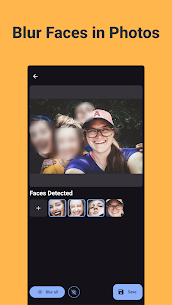
Easily anonymize faces and protect your privacy with Blur Face, the ultimate app for blurring faces and sensitive information in your photos.
Our AI-powered facial detection technology quickly identifies faces in your images, allowing you to blur them with just one tap. Whether you're sharing photos online or keeping personal moments private, Blur Face is your go-to tool for fast and secure photo editing—all without an internet connection.
Key Features:
* Automatic Face Detection: Instantly detect and blur faces in your photos with advanced AI technology.
* Manual Blurring: Not just for faces! Easily select and blur any part of your image to protect sensitive information.
* Works Fully Offline: No data collection, no internet required. Your photos never leave your device.
* User-Friendly Interface: Simple and intuitive design makes blurring faces a breeze, even for beginners.
* Privacy Protection: Ensure your photos remain private and secure by blurring identifiable features before sharing.
With Blur Face, your data is always secure. The app works completely offline, so your images never leave your device, and no data is collected. Whether you're looking to protect your privacy, obscure background details, or comply with privacy regulations, Blur Face offers the perfect solution.
Download Blur Face today and take control of your photo privacy with just one tap!
Images


Download links
How to install Blur Face - Censor Image?
1. Download the ZIP file.
2. Install the Split APKs Installer application
3. Open the application and click on "Install APKs".
4. Find the folder where the downloaded ZIP is located and select it.
5. Follow the steps that appear on the screen.
Related apps







Latest Apps
Most rated apps


