
Photo Blur – mosaic editor
tanocee Inc.
Sep 16, 2023
Nov 24, 2025
37.18 MB
Varies with device
Varies with device
1,000+

Description
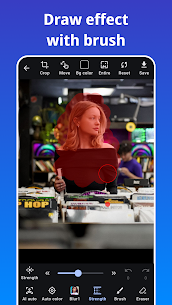
Photo Blur is a picture blur tool to make your photo blur effects.
And also can crop/cut photo as a photo editor. You can easily to draw blur and mosaic effect on your photos by using our app.
Photo Blur can automatically crop the background, blur and mosaic the background, and easily process photos with only the background in a single tap.
The face recognition function allows you to blur and mosaic faces with a single tap, even in photos with multiple people in the picture. Personal information such as faces, car license plates, and private information can be hidden by blur or mosaic using Photo Blur to support safe sharing of images on social networking sites.
Photo Blur provides multiple effects for blur or mosaic your photo such as median blur (like stylish and cool effect). And you can use all of them for free.
Features of Photo Blur:
– Blur and mosaic on photos
– Automatically blur and mosaic on photos
– One-tap blur feature with automatic face detection.
– Image cropping.
– Zoom image while editing.
– Eraser tool.
– Adjust the strength of effects.
– crop/cut photos
– Automatically crop/cut background
Types of Effects:
– Gaussian Blur.
– Median Blur.
– Box Blur.
– Mosaic.
Images




Download links
How to install Photo Blur - mosaic editor?
1. Download the ZIP file.
2. Install the Split APKs Installer application
3. Open the application and click on "Install APKs".
4. Find the folder where the downloaded ZIP is located and select it.
5. Follow the steps that appear on the screen.
Related apps







Latest Apps
Most rated apps


